| ㆍ Junk refers to items that can be easily sold or dismantled. |
1. What is Junk?
Junk refers to items that can be easily sold or dismantled.
Items designated as junk can all be sold/dismantled at once.
2. Designate as Junk
You can designate all items that you want to sell/dismantle using the Exclude Junk Filter,
or individually add items as junk yourself.
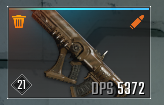
Items that have been designated as junk will have a trash can icon at the top left.
Any items that are part of Attached Items or not included in the "Filter all as junk" settings will not be designated as junk when using "Designate all as junk".
* Designating certain items as junk: Hover over the item you wish to designate as junk > Designate Junk (J)
* Designate all as junk: Designate all as junk (Shift)
* Deselect Junk: Remove all as junk (Tap)
|
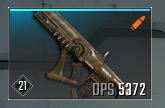
<Item not designated as junk>
<Item designated as junk> |
Items designated as junk can all be sold/dismantled at once.
Dismantling Junk will give you crafting materials, and selling Junk will give you Gold.
* Dismantling Junk: Inventory (I) > Dismantle Junk (Ctrl) (If there is designated junk)
* Selling Junk: Albion > Talk to Deslin (E) > Sell Junk (C) (If there is designated junk)
3. Exclude Junk Filter
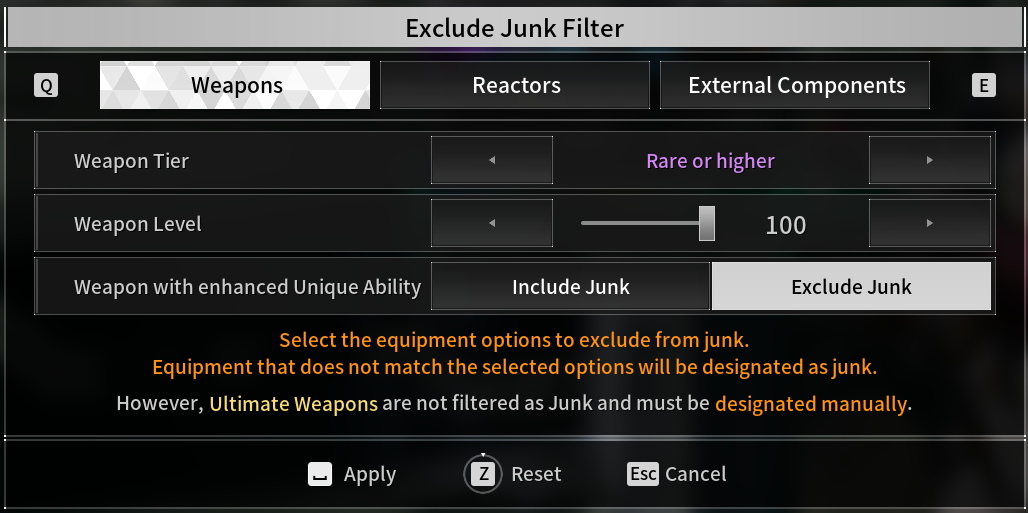
To avoid accidentally selling/dismantling important equipment, you can set exclusion criteria for designating items as junk with the Exclude Junk Filter, which allows you to designate all the items as junk if they don't meet the criteria.
The settings for the junk filter can be adjusted as below.
| Equipment Type | Filter Conditions |
| Weapons | Tier, Level, and Weapons with enhanced Unique Abilities |
| Reactors | Tier, Level, and Enhanced Reactors |
| External Components | Tier, Level, External Components with Set Effects |
* Adjusting the settings for "Exclude Junk Filter": Inventory (I) > Equip Weapon (A) or Equip Accessory (D) > Select "Exclude Junk Filter" at the bottom left
* For Tiers and Levels, all items equal to or more than the designated setting will be selected.
Ex 1) Normal and Rare Tier items will be selected when the filter is set as "Rare Tier and lower".
Ex 2) Items between Lv. 1 and 23 will be selected when setting the Level as 23.
Ultimate Weapons are not designated as junk in bulk and must be designated manually.
|
<The "Exclude Junk Filter" can be set for Weapons, Reactors, and External Components.> |