
Equipping modules of the same type as the socket type of the module slot reduces Module Capacity cost.
Socket type is only applied to Descendant Module slots, not to Weapon Module slots.
You can assign the desired socket type to a module slot by going to 'Module Additional Settings > Assign Module Socket Type' from the right side of the Module Settings screen
to better manage module capacity.
However, please note that equipping a module with a different socket type will increase the capacity cost.
The conditions for assigning module socket types are as follows and 'Crystallization Catalysts’ are required.
- To assign Descendant Socket Type: Requires max level (currently level 40)
- To assign Weapon Socket Type: Requires max Proficiency (currently level 40)
- 'Crystallization Catalysts' can be crafted through Research Requests.
When the module socket type is assigned, the equipment/Descendant level will be reset.
Once you reach the maximum level again, you can use the Crystallization Catalyst to assign additional module socket types.
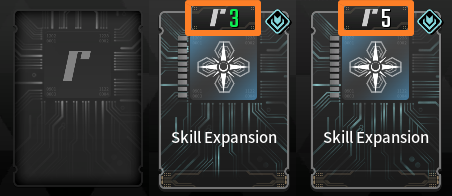
<Example: Capacity cost reduces to 3 instead of 5 when equipped with the same socket type as the module socket.
Takes up capacity 5 when equipped with a different socket type.>